Logs to Track All Actions Performed in the Batch Operations Screen
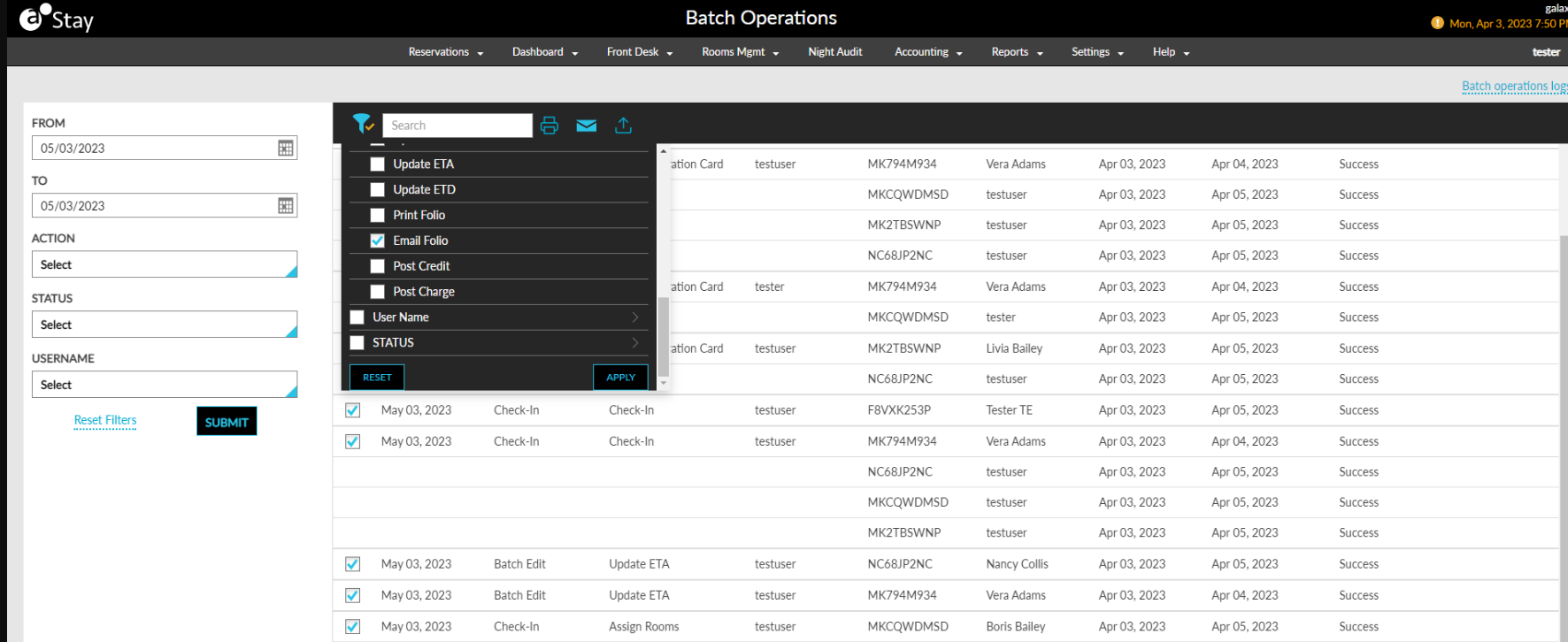
Stay is enhanced to save logs for all the actions performed by users in the Batch Operations screen. Each action performed in the Batch Operations screen is displayed as an individual entry in the Batch Operations Log screen. Additionally, users can perform the following actions on this screen:
-
Sort
-
Filter
-
Search
-
Print
-
Email
-
Export
To support this enhancement, a new hyperlink, Batch Operations Logs, is added to the top right corner of the Batch Operations screen. On clicking, users are navigated to the Batch Operations Log screen.
Batch Operations Logs Screen
-
The Batch Operations Logs screen displays the following input parameters:
|
|
|---|---|
|
|
|
|
|
|
|
|
|
|
-
The following columns are displayed for the generated logs:
|
|
|---|---|
|
|
|
|
|
|
|
|
|
|
|
|
|
|
|
|
|
|
|
|
-
Users can select the count of records to be displayed per page (10, 20, or 50 records).
-
Pagination is provided to help users navigate to the previous and next pages.
-
Users can print the generated logs by clicking on the Print icon.
-
Users can email the generated logs by clicking on the Email icon. When clicked, users are prompted to enter the email address to which the log file should be emailed.
-
Users can export the logs as a CSV file by clicking on the Export icon.